kastor0.1.0
Get started
Newkastor 0.1.0: ten databases, one schema

The TypeScript ORM for every database.

Write your schema in plain TypeScript and the types are there as you type. No generate step, no binary engine. Nested includes in one query, readable migrations and a local studio on PostgreSQL, MySQL, SQLite, SQL Server, Oracle, MongoDB and four more.

Get started Open the playground
npm i kastor-orm

One schema and one API on the databases you already run

  • PostgreSQL
  • CockroachDB
  • MySQL
  • MariaDB
  • SQLite
  • libSQL / Turso
  • Cloudflare D1
  • SQL Server
  • Oracle
  • MongoDB

Schema and types

Write a schema, get types instantly

Tables and relations are ordinary TypeScript values. The compiler infers every result from them, so the types are already there on the next keystroke.

  • Plain TypeScript. No schema language, no extension, and your editor understands every line.
  • No generate step. Nothing to rerun after a change, nothing to forget in CI.
  • Shaped by the query. Includes add relations to the result, select narrows it.
  • Rename safely. Rename a column and every call site lights up in the editor.
src/db/schema.ts
import { table, t } from 'kastor-orm'

export const users = table('users', {
  id: t.id(),
  email: t.string(255).unique(),
  name: t.string().nullable(),
  role: t.enum(['user', 'admin']).default('user'),
  createdAt: t.datetime().defaultNow(),
})

export const posts = table('posts', {
  id: t.id(),
  title: t.string(200),
  published: t.boolean().default(false),
  authorId: t.int().references(() => users.id),
})
src/app.tsTypes up to date
import { db } from './db'

const user = await db.users.findUnique({
  where: { email: 'ada@acme.com' },
  include: { posts: true },
})

user?.posts[0].title

Inferred, not generated

const user: {
  id: number
  email: string
  name: string | null
  role: 'user' | 'admin'
  createdAt: Date
  posts: {
    id: number
    title: string
    published: boolean
    authorId: number
  }[]
} | null

Relations

Nested includes in one query

Ask for authors and their latest posts and kastor sends one statement, built for the database you run. Never one query per row.

src/feed.ts
const authors = await db.users.findMany({
  where: { email: { endsWith: '@acme.com' } },
  select: {
    name: true,
    posts: {
      where: { published: true },
      orderBy: { views: 'desc' },
      take: 3,
      select: { title: true, views: true },
    },
  },
})
SELECT "t0"."name" AS "name", (
  SELECT COALESCE(json_agg("s"."j" ORDER BY "s"."rn"), '[]'::json)
  FROM (
    SELECT json_build_object('title', "t1"."title", 'views', "t1"."views") AS "j", ROW_NUMBER() OVER (ORDER BY "t1"."views" DESC) AS "rn"
    FROM "posts" "t1"
    WHERE "t1"."authorId" = "t0"."id" AND ("t1"."published" = $1)
    ORDER BY "t1"."views" DESC
    LIMIT 3
  ) "s"
) AS "posts"
FROM "users" "t0"
WHERE "t0"."email" LIKE $2 ESCAPE '!'

One statement per call. Compiled at build time by the same code that ships on npm.

JSON aggregation on PostgreSQL, MySQL, MariaDB, SQLite, SQL Server and Oracle.

One pipeline with $lookup stages on MongoDB.

Every level takes its own where, orderBy, take and select.

Migrations

Migrations you can read

Change the schema, run one command. kastor diffs it against the live database, explains the plan in plain English and writes a SQL file you review and commit.

  • Careful by default. Warns before anything that can fail or lose data, and asks before it treats a rename as a drop.
  • Plain SQL files. One folder per migration, a header that says what changed, nothing hidden.
  • Built for CI. migrate deploy applies pending files, migrate status catches drift.
  • Existing database? db pull writes the schema from it, migrate baseline adopts it.
src/db/schema.ts
export const posts = table('posts', {
  id: t.id(),
  title: t.string(200),
  slug: t.string(220).unique(),
  views: t.int().default(0),
  published: t.boolean().default(false),
})
Terminal
$ npx kastor migrate dev --name add_slug_and_views

kastor / migrate dev

  Config      kastor.config.ts
  Database    postgres
  Schema      src/db/schema.ts
  Migrations  kastor/migrations

ok    Loaded 2 tables from the schema
Changes  3 to add, 0 to change, 0 to drop

  + Add column posts.slug
  + Add column posts.views
  + Create unique index posts_slug_key on posts (slug)

  warn  Column posts.slug is required and has no default, so adding
        it fails if posts already has rows.
        Give it a default, make it nullable, or fill it in a second migration.

ok    Wrote kastor/migrations/20261014093012_add_slug_and_views/migration.sql
ok    Applied 20261014093012_add_slug_and_views 41 ms
migration.sql
-- Migration 20261014093012_add_slug_and_views
-- Written by kastor 0.1.0 for postgres.
--
-- Changes:
--   + Add column posts.slug
--   + Add column posts.views
--   + Create unique index posts_slug_key on posts (slug)

-- Add column posts.slug
ALTER TABLE "posts" ADD COLUMN "slug" varchar(220) NOT NULL;

-- Add column posts.views
ALTER TABLE "posts" ADD COLUMN "views" integer DEFAULT 0 NOT NULL;

-- Create unique index posts_slug_key on posts (slug)
CREATE UNIQUE INDEX "posts_slug_key" ON "posts" ("slug");

Migrate

Move from Prisma in one command

Point kastor at schema.prisma and get a TypeScript schema with the same table, column and constraint names. A baseline keeps the history Prisma already applied, so nothing in the database moves.

  • Same names, same tables. Models, enums, implicit join tables and relation fields carry over.
  • History kept. migrate baseline --from-prisma records every applied migration.
  • Any other ORM. db pull reads the live database into a schema file.

All migration guides

Terminal
$ npx kastor import prisma

kastor / import prisma

  Prisma schema  prisma/schema.prisma
  Provider       postgresql (kastor-orm/postgres)

ok    Wrote src/db/schema.ts: 3 models, 1 join table, 1 enum, 4 relation fields.
ok    Every model, field and relation mapped exactly.

  +------------------------------------------------------------+
  | Next steps                                                 |
  | 1. Read src/db/schema.ts and point kastor.config.ts at it. |
  | 2. kastor migrate baseline --from-prisma prisma/migrations |
  |    records the database as it is now, without changing it. |
  | 3. kastor migrate dev should then say: Already in sync.    |
  +------------------------------------------------------------+

Studio

See your data. Edit it. Understand the shape.

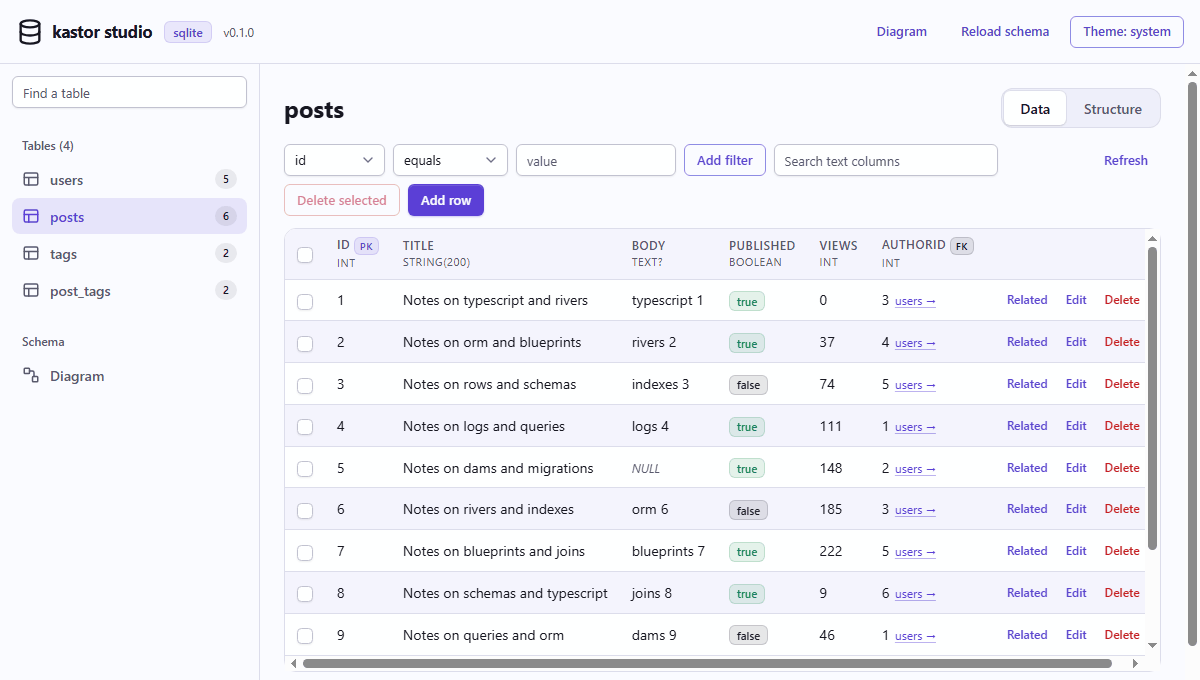
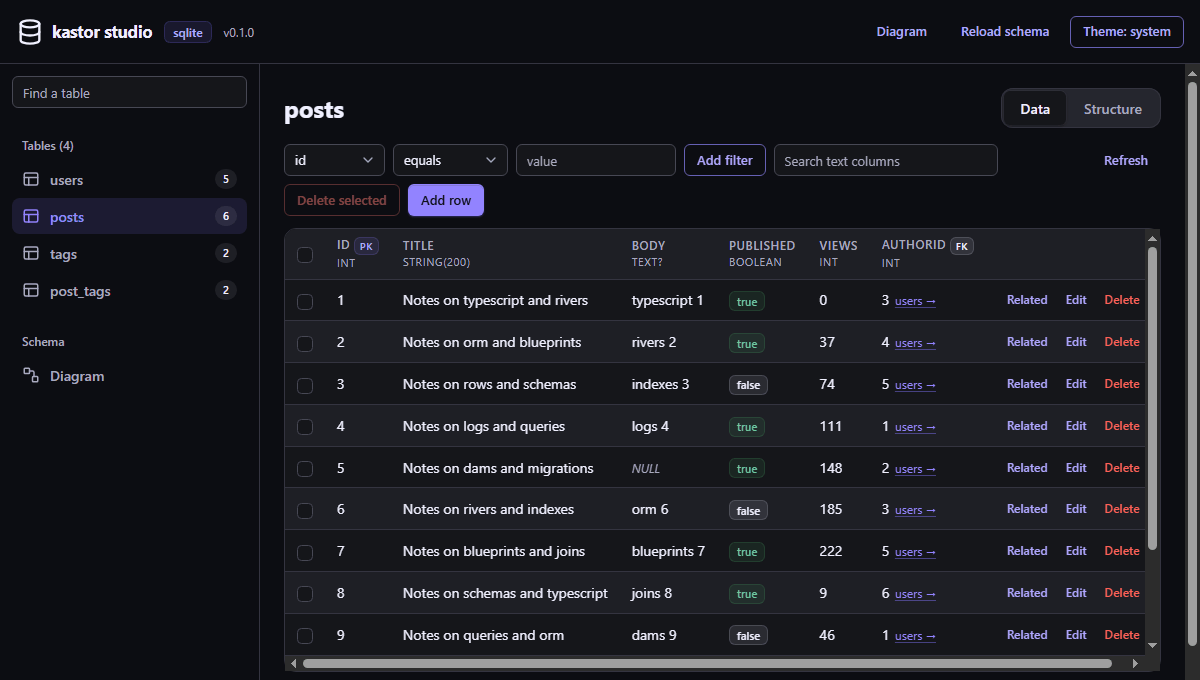
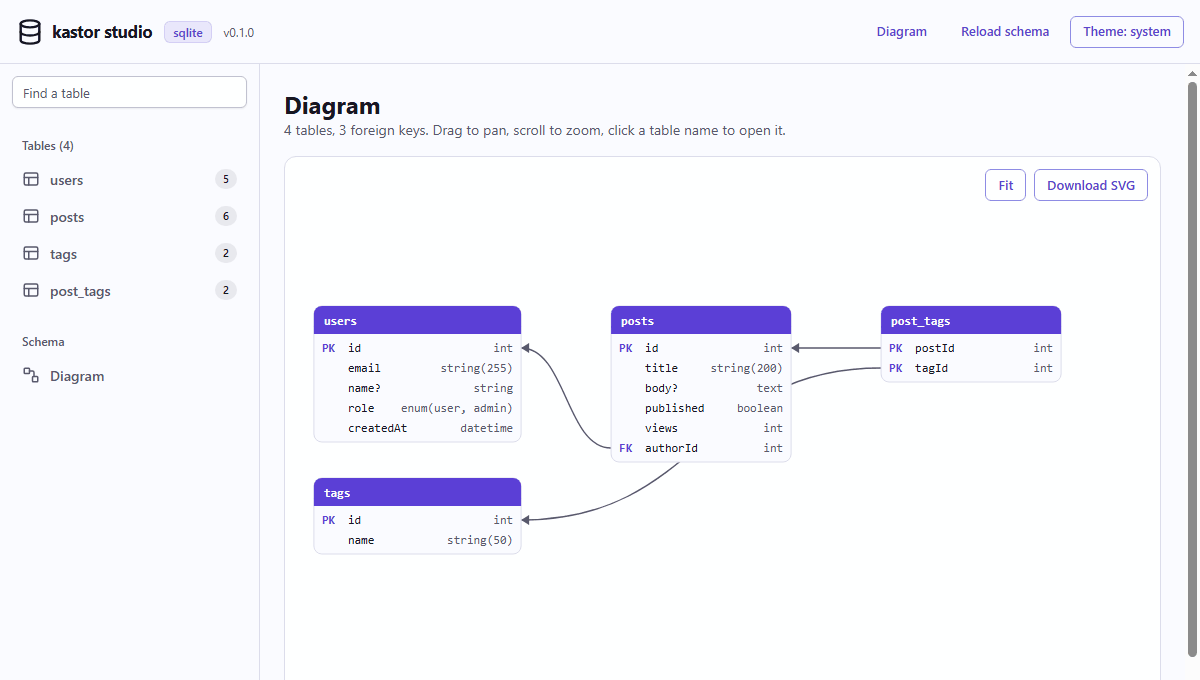
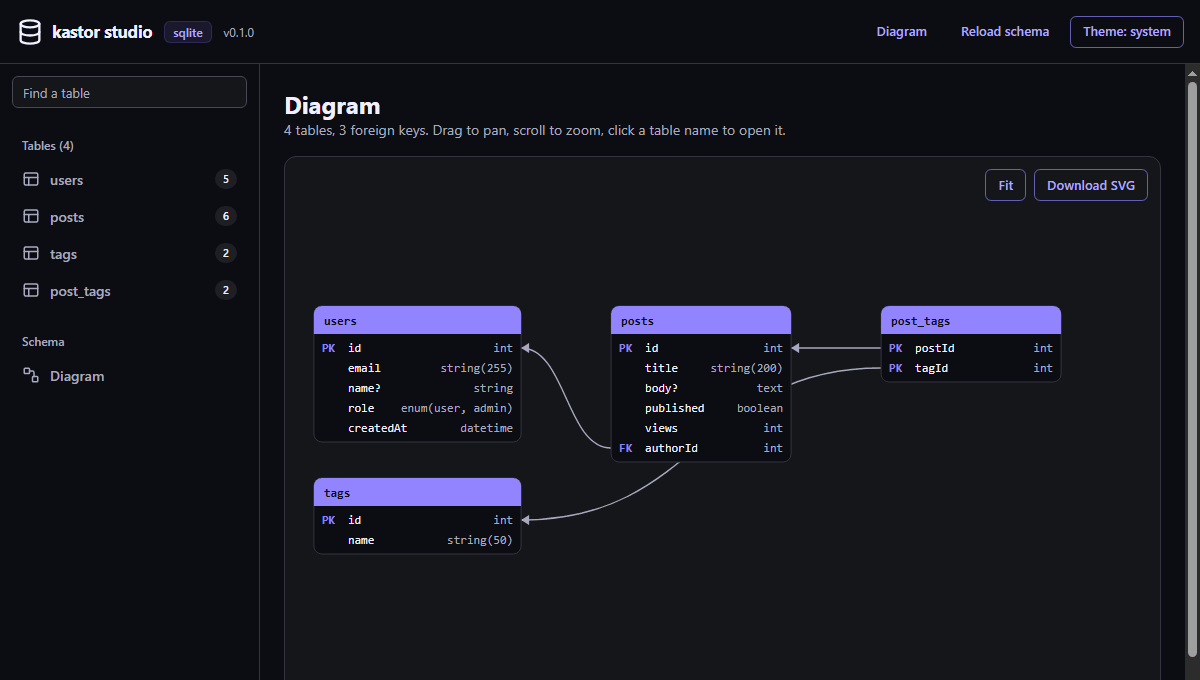
Run npx kastor studio and a local web UI opens on your machine: browse every table, filter and search, edit rows, follow foreign keys and read the diagram of the whole database.

127.0.0.1:5555
The kastor studio browsing the posts table: filters, rows, foreign keys and actionsThe kastor studio browsing the posts table: filters, rows, foreign keys and actions
The kastor studio diagram of users, posts, tags and post_tags with their foreign keysThe kastor studio diagram of users, posts, tags and post_tags with their foreign keys
Real screenshots of npx kastor studio on the playground schema with SQLite.
  • Runs on 127.0.0.1 behind a private session token, with your own config.
  • Filters, text search, paging and a read only mode for data you must not touch.
  • A diagram drawn from the live schema, downloadable as SVG.

Live playground

Type a schema. Watch the types and the SQL appear.

This is the real kastor compiler running in your browser. Edit the schema or the query: the result type is checked by the TypeScript compiler, and the SQL is compiled for every database side by side. Open Rows to run it on SQLite in this page.

Loading the compiler
// The inferred type appears here

kastor 0.1.0 compiled for the browser from the same source as the npm package.

Database support

One schema, ten databases

Every adapter takes the driver you already use. The same queries compile to each dialect: JSON aggregation for includes, the native way to return written rows, the native upsert.

DatabaseImportDriverIncludesWritten rowsUpsertPagingTransactionsMigrations
PostgreSQL kastor-orm/postgres pg json_agg + json_build_object RETURNING ON CONFLICT LIMIT / OFFSET yes yes
CockroachDB kastor-orm/cockroach pg json_agg + json_build_object RETURNING ON CONFLICT LIMIT / OFFSET yes yes
MySQL kastor-orm/mysql mysql2 JSON_ARRAYAGG + JSON_OBJECT Re-select by key ON DUPLICATE KEY UPDATE LIMIT / OFFSET yes yes
MariaDB kastor-orm/mariadb mariadb JSON_ARRAYAGG + JSON_OBJECT Re-select by key ON DUPLICATE KEY UPDATE LIMIT / OFFSET yes yes
SQLite kastor-orm/sqlite better-sqlite3 json_group_array + json_object RETURNING ON CONFLICT LIMIT / OFFSET yes yes
libSQL / Turso kastor-orm/libsql @libsql/client json_group_array + json_object RETURNING ON CONFLICT LIMIT / OFFSET yes yes
Cloudflare D1 kastor-orm/d1 D1 binding json_group_array + json_object RETURNING ON CONFLICT LIMIT / OFFSET Batch yes
SQL Server kastor-orm/mssql mssql FOR JSON PATH OUTPUT MERGE TOP / OFFSET FETCH yes yes
Oracle kastor-orm/oracle oracledb JSON_ARRAYAGG + JSON_OBJECT RETURNING INTO MERGE OFFSET / FETCH NEXT yes yes
MongoDB kastor-orm/mongodb mongodb $lookup pipeline Native documents findAndModify, then insert $skip / $limit yes yes

The adapters share one conformance suite, run against real databases in CI. Serverless Postgres (Neon, Supabase, Vercel Postgres) runs through pg compatible pools and PlanetScale through mysql2.

Everything else

Everything a data layer needs

12 more details. Each one is real code that runs on every supported database.

Schema in plain TypeScript

Tables, columns, indexes and relations are ordinary TypeScript values. No schema language to learn, no extension to install, and your editor already understands every line.

src/db/schema.ts
import { table, t, index } from 'kastor-orm'

export const users = table('users', {
  id: t.id(),
  email: t.string(255).unique(),
  name: t.string().nullable(),
  role: t.enum(['user', 'admin']).default('user'),
  createdAt: t.datetime().defaultNow(),
})

export const posts = table('posts', {
  id: t.uuid().primaryKey().defaultRandom(),
  title: t.string(200),
  published: t.boolean().default(false),
  authorId: t.int().references(() => users.id, { onDelete: 'cascade' }),
}, { indexes: (p) => [index(p.authorId)] })

Get started

Get started in 60 seconds

Pick your database. Three steps, and the schema from the playground is all you need: put it in src/db/schema.ts.

  1. 1

    Install kastor and the driver

    Terminal
    npm i kastor-orm pg
  2. 2

    Create the client

    Also Neon, Supabase and Vercel Postgres through pg compatible pools.

    src/db/index.ts
    import pg from 'pg'
    import { kastor } from 'kastor-orm'
    import { postgres } from 'kastor-orm/postgres'
    import { schema, relations } from './schema'
    
    const pool = new pg.Pool({ connectionString: process.env.DATABASE_URL })
    
    export const db = kastor({ adapter: postgres(pool), schema, relations })
  3. 3

    Create the tables and query

    Terminal
    npx kastor migrate dev --name init
    src/app.ts
    const users = await db.users.findMany({ include: { posts: true } })

Comparison

How kastor compares, by approach

There are many good ORMs. They make different trade-offs, so this table compares approaches rather than products. Check each tool's docs for its current details.

AspectkastorGenerated client ORMsSQL first query buildersDecorator ORMs
Where the schema livesTypeScriptA schema file in its own languageTypeScriptClasses with decorators
Types after a schema changeInferred on the next keystrokeAfter running a generate commandInferredDeclared by hand on classes
Query styleObjects: where, include, selectObjects: where, include, selectSQL shaped builder, plus a relational API in some toolsRepositories and a builder
Nested relationsOne query per root call (JSON aggregation)Varies by tool and versionVaries by APIJoins or extra queries
Migrations from the schemaBuilt in, rename detection asks firstUsually built inUsually a separate kitUsually built in
Same API on SQL and MongoDBYesVaries by toolUsually SQL onlyVaries by tool
Runtime dependenciesZero (bring your driver)VariesSmallSeveral

Coming from a specific tool? The migration guides map every concept and command, from Prisma and Drizzle to Laravel and Rails.

Guides

Long reads on the problems an ORM should solve

36 guides in English and more in Portuguese, from N+1 queries to running one data layer on every database.

All 36 guidesGuias em português

FAQ

Questions people ask

Still curious? Open an issue on GitHub and Kas will take a look.

What is the best TypeScript ORM for multiple databases?

Pick one that infers types straight from a TypeScript schema and runs the same query API on every database you need. kastor supports PostgreSQL, CockroachDB, MySQL, MariaDB, SQLite (better-sqlite3, node:sqlite, bun:sqlite), libSQL and Turso, Cloudflare D1, SQL Server, Oracle and MongoDB with one schema and one API.

Does kastor need a generate step or a binary engine?

No. Types are inferred from the schema by the TypeScript compiler as you type, and queries are compiled to SQL in plain JavaScript. There is nothing to regenerate in CI and nothing native to download.

How does kastor avoid N+1 queries?

Nested includes load in one statement per root call: JSON aggregation on every SQL database and a single aggregation pipeline with $lookup stages on MongoDB. Never one query per row. See the N+1 guide.

How do I migrate from Prisma to kastor?

Run npx kastor import prisma to turn schema.prisma into a TypeScript schema, then npx kastor migrate baseline --from-prisma prisma/migrations so the migrations Prisma already applied stay recorded. Your data never moves. The Prisma migration guide maps every client call, and the migration hub covers Drizzle, TypeORM, Sequelize, Knex, Mongoose, Laravel, Django and Rails.

Can I use kastor with an existing database?

Yes. Run npx kastor db pull to introspect the live database into a TypeScript schema file, relations included, then query it right away. Migrations can take over from there when you are ready.

Which drivers does kastor install?

None. kastor ships no database drivers: you install the one you want (pg, mysql2, better-sqlite3, mssql, oracledb, mongodb and so on) and pass its instance to the adapter. Drivers are optional peer dependencies.

Does kastor work on serverless and edge runtimes?

Yes, wherever the driver works: Cloudflare Workers with D1, Turso over HTTP, Neon, Supabase and Vercel Postgres through pg compatible pools, Bun with bun:sqlite and Deno with npm specifiers. The core has no Node only imports.

Is kastor free?

Yes. kastor is open source under the MIT license, including the CLI, migrations and the studio.

Lay the first log.

One install, one schema file, and your database is typed end to end.

Get started
npm i kastor-orm

Suggestions

Kas looked under every log. Nothing matches that yet.

Try a method name, a database or a framework.